
This guide explains how to configurate the Airframe Connect.
Step-by-step instructions for configuration settings for the Media-Anywhere plugin on supported systems.
Before proceeding, please ensure your system meets the requirements listed in Supported & Recommended Platforms.
To access to Airframe Connect configuration module, click on the settings icon.

The settings menu will display the configurable options:
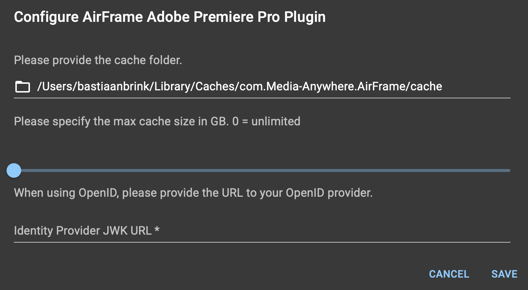
By clicking on the cache folder path, a browser window will open and allows you to select the folder where the plugin will store caching files.
The max cache size, allows you to set a maximum cache size on the local machine.
In case you are required to set a Identiy Provider, you are able to configure this in the JWK URL section.
In case of any additional questions please contact our support team for assistance.